
SEKO Dosing Pump Programming: Tekna Menu, Manual and Pulse Mode
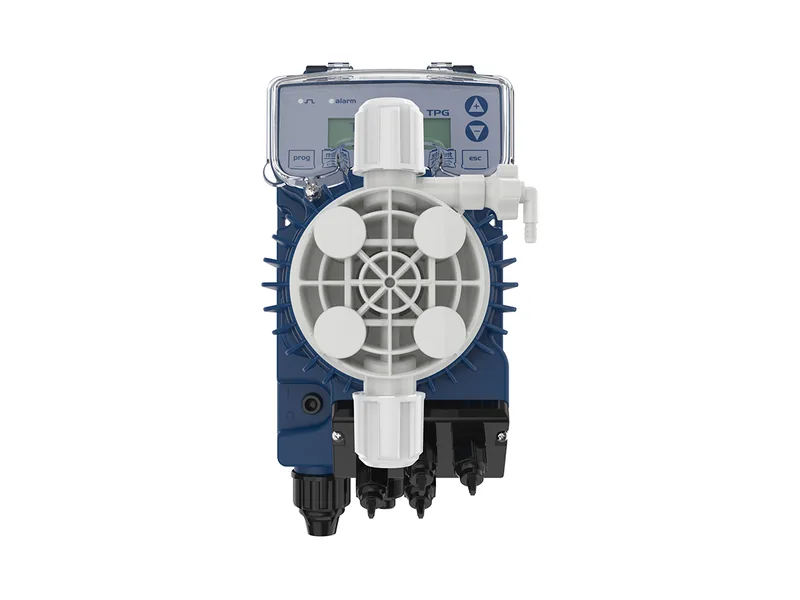
SEKO dosing pump programming starts with one question: is your Tekna an analog model with a knob, or a digital model with a display and menu? AKS, AKL and APG use a front knob, while TPG and TPR have an LCD and push buttons. Once you know which one you have, SEKO dosing pump programming takes only a few minutes. Exact key names and menu paths can vary by firmware, so keep the manual that shipped with the pump nearby.
Read the Nameplate First
The Tekna model code starts with the control version. A plate reading AKL 603 N H P 0 800, for example, tells you it is an AKL (manual with level probe input), size 603, with N meaning a 100–240 V supply. Write the full code down before any SEKO dosing pump programming, because you will need it for manuals, spares and support.
The five control versions break down like this:
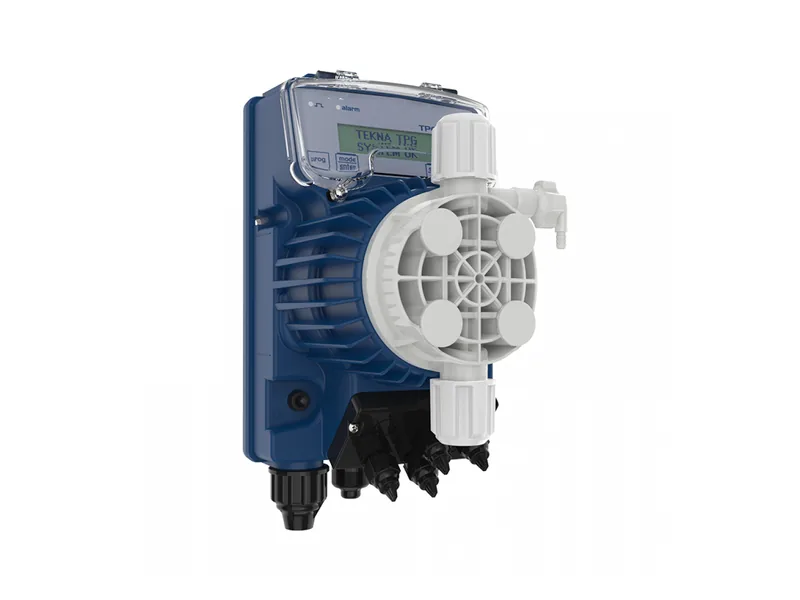
Figure 1: SEKO Tekna TPG digital panel. Image source: SEKO official website
- AKS: manual knob control, supplied with a bracket.
- AKL: the same knob control plus a level probe input.
- APG: knob panel that also follows a 4–20 mA or pulse signal.
- TPG: digital panel with 0/4–20 mA and pulse modes, plus timer and PPM functions.
- TPR: digital panel with a built-in pH/ORP controller and BNC probe input.
SEKO Dosing Pump Programming on AKS and AKL
On the AKS and AKL there is not much to program. You get a power light and a knob that sets the stroke rate as a percentage. The useful detail is that the knob offers two ranges: 0–20% and 0–100%.
Why two ranges? On the 0–20% range a full turn of the knob covers only one fifth of the maximum stroke rate, so you get much finer control at low doses. Switch to 0–100% when you need higher output. The dial is a guide, not a calibrated scale, so measure real output with a graduated cylinder or calibration column and trim the knob from there.
APG Pulse Ratios and DIP Switches
The APG adds two items to SEKO dosing pump programming. The knob can work in percentage mode or in a multiplier mode. With a water meter input, the pump can respond at 1:1, 4:1, 10:1 or 1:N. A 10:1 ratio means ten pulses produce one stroke, which suits meters that send pulses very often.
The ratio is selected with internal DIP switches. Isolate power before changing them, then power up again, and check the switch table in the manual rather than relying on memory. In 4–20 mA mode the stroke rate typically follows the current signal in a linear way. Signal wiring choices are explained in our guide to 4-20mA and pulse control.
SEKO Dosing Pump Programming on the Tekna TPG Menu
The TPG has an LCD and a small keypad. The official product image shows a prog key and a mode/enter key, and the screen shows the model and system status at power-up. SEKO's menu offers five languages, and once you pick a function the display shows only the parameters linked to that function. That keeps TPG SEKO dosing pump programming quicker than scrolling through one long list.
Three SEKO Dosing Pump Programming Modes
- Manual (constant): the pump runs at a set stroke rate or flow, for steady dosing.
- mA proportional: the pump follows a 0/4–20 mA signal from a flow meter or PLC.
- Pulse proportional: the pump doses per water meter pulse, so more water means more chemical.
Extra Functions
The TPG also includes a timer, PPM dosing, run statistics, password protection and remote start/stop. Setting a password is worth it on shared sites so settings are not changed by accident. Save and exit the menu after editing, since cutting power mid-edit may leave the old values in place.
SEKO Dosing Pump Programming on the TPR
The TPR has a built-in pH/ORP controller and adjusts output from the probe reading, which suits pools, spas and cooling water. Calibrate the probe first; pH and ORP both support automatic or manual calibration, and the probe must have a BNC connector. The TPR also has a level input with low-level alarm and an external remote start/stop input.
A Practical Setup Sequence
Whatever the panel, the first SEKO dosing pump programming session can follow the same order:
- Fit the level probe in the tank, if your version has one, so the pump does not start in a low-level state.
- Bleed air from the head using the bleed valve until chemical flows steadily.
- Pick the mode: manual for fixed doses, pulse to follow water volume, mA to follow a PLC or analyzer.
- Set the rate, collect output for one minute, convert to L/h and compare with the target.
Common Setup Mistakes
Even with the manual in hand, a few SEKO dosing pump programming mistakes come up again and again. The knob sits on the 0–20% range while the operator assumes full scale, so the dose stays low. APG DIP switches are set to the wrong ratio. A TPG password is set but nobody records it. If the screen shows an alarm message, see our SEKO alarm codes guide. General keypad and mode ideas are covered in our solenoid metering pump user guide, and you can compare models in our solenoid metering pump range or on the SEKO brand page.
Conclusion
Good SEKO dosing pump programming follows one rule: identify the model, then set it. AKS and AKL need the knob and range, APG adds pulse ratios and DIP switches, TPG uses the menu for manual, mA or pulse mode, and TPR adds pH/ORP calibration. After setup, measure real output; the gap is usually small enough to trim. If a model code is unclear or you need a manual for your version, send a nameplate photo through our contact page.
FAQ
In SEKO dosing pump programming, how do I switch the 0–20% and 0–100% ranges?
It is usually done on the front panel, though the location can vary by version. Use 0–20% for small doses and finer control.
What does 1:N mean on the APG?
One pulse produces N strokes, with N set by the user. It suits water meters that send pulses far apart.
What if I forget the TPG password?
Follow the recovery steps in the manual or contact your SEKO distributor. Opening the pump is not recommended.
Is it normal for flow to differ from the dial?
Yes. Real output typically depends on back pressure, suction lift and viscosity, so measure and trim.
Where can I find the SEKO manual?
A printed manual usually ships with the pump, and an authorized distributor can typically supply the PDF for your model.