
Solenoid Dosing Pump Operation: Keypad, Display and Modes
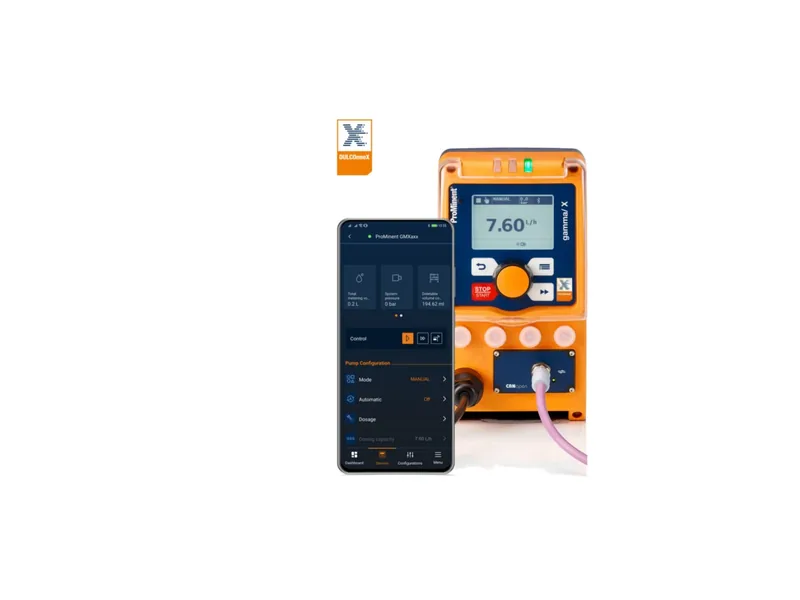
Solenoid dosing pump operation looks simple until you face the control panel for the first time. Stroke rate or stroke length, which one do you change? What does contact mode do, and when do you need batch mode? This guide answers those questions using the ProMinent gamma/X as the example, with notes that carry over to most modern solenoid pumps.
The Panel: Where Solenoid Dosing Pump Operation Starts
The gamma/X and gamma/XL share the same operating concept. There is an illuminated 3-inch LCD, a click wheel, four operating keys and a three-LED status display next to the screen.
In practice, solenoid dosing pump operation on this panel works like this:
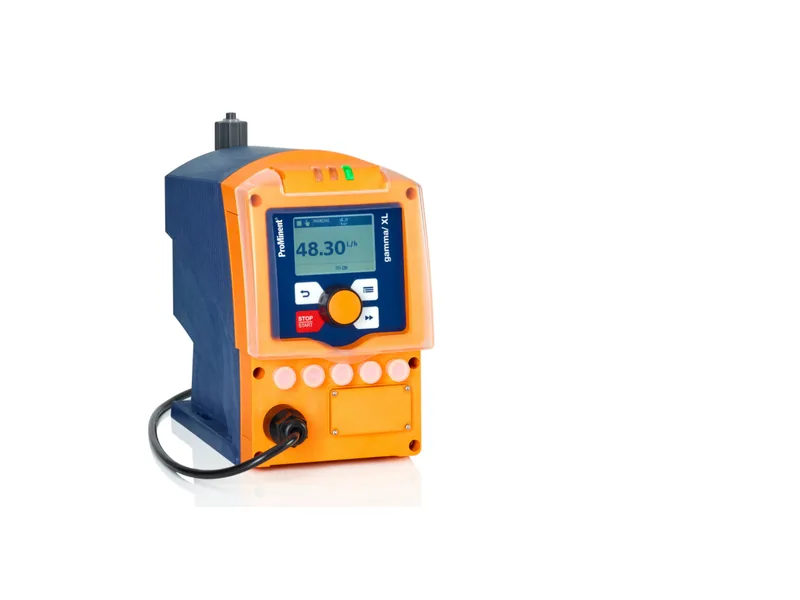
Figure 1: ProMinent gamma/XL solenoid metering pump. Image source: ProMinent official website
- Turn the click wheel to move through menus or change a value, then press it to confirm.
- Use the keys to start and stop, go back, or switch what the display shows.
- Read the LEDs from across the room: they separate normal running, warnings and faults by color.
The screen typically shows the active mode, the flow or stroke rate, and any alarm text. Menu names can differ slightly between firmware versions, so keep the manual close.
Manual Mode: Stroke Rate and Stroke Length
Manual mode is where most people start, and it is where most confusion happens. In solenoid dosing pump operation, flow depends on two settings:
- Stroke rate, adjustable on the gamma/X from 1 to 12,000 strokes per hour.
- Stroke length, set electronically from 0 to 100%, with ProMinent recommending 30 to 100%.
Why avoid very short strokes? Each stroke then moves a tiny volume, the check valves do not seat cleanly, and repeatability suffers. The steadier approach is to keep stroke length in the middle-to-high range and trim flow with stroke rate.
The gamma/X also lets you enter the metering rate directly in l/h, with finer setting in ml in automatic mode, so you do not need to convert strokes by hand. For more tuning tips, see our guide to solenoid metering pump flow adjustment.
Operating Modes for Solenoid Dosing Pump Operation
Manual control is fine for a test, but many plants need the pump to follow a flow meter or a PLC. Two modes cover most of that solenoid dosing pump operation.
Contact mode takes external pulses, for example one pulse per set volume from a water meter, and runs strokes at a set ratio. On the gamma/X the contact factor can be set from 99:1 to 1:99, which suits flow-proportional dosing.
Batch mode delivers a fixed quantity for each start signal, up to 99.99 liters or 99,999 strokes. It fits mixing tanks and intermittent dosing.
The pump also offers a timer for scheduled start and stop, and a concentration mode for setting a target concentration. Analog input control depends on the exact model and options, so confirm it during selection. Wiring details are in our solenoid metering pump wiring guide.
Level Switch and Output Signals
The gamma/X has a connector for a two-stage level switch. Stage one is a pre-warning that the tank is getting low. Stage two is the empty-tank alarm, and the pump stops so it does not draw air into the dosing head. Wiring the level switch is one of the cheapest ways to protect solenoid dosing pump operation overnight.
Optional 0/4-20 mA output and relay modules send status and fault signals back to the control room. If the site has a DCS, connect at least the fault relay so the night shift knows when a pump stops.
Reading the Pressure Alarms
The gamma/X has integrated pressure measurement and can detect three conditions: gas in the dosing head, overpressure and no pressure. They are useful clues during solenoid dosing pump operation:
- Gas in the dosing head: usually a suction leak, a gassing chemical such as hypochlorite, or an empty tank.
- Overpressure: a closed discharge valve, a blocked line or a back-pressure valve set too high.
- No pressure: a disconnected or leaking discharge line, or a pump that is not actually delivering.
The pump also keeps a log book of the last 300 events. When an alarm appears, check the log first. Seeing when the trouble began is typically faster than guessing on site.
First Setup Sequence for Solenoid Dosing Pump Operation
Putting it together, a first setup usually goes like this:
- Confirm the supply is within 100 to 230 V and connect power and signal cables.
- In manual mode, set stroke length to 100% and run at a high stroke rate to prime until liquid flows steadily at the outlet.
- Set the required flow and bring stroke length back to the middle-to-high range.
- Calibrate with a measuring cylinder and fine-tune.
- Switch to contact or batch mode and hand control to the external signal.
For priming and venting details, read our solenoid diaphragm pump commissioning guide.
Common Mistakes in Solenoid Dosing Pump Operation
A few errors show up again and again. Some operators turn stroke length down to about 10% to chase a low flow, and the output becomes erratic. Others forget to check the water meter pulse value in contact mode, so the dose is off by a large factor. A missing level switch lets the pump run dry and fill the head with gas. And many people press reset on an alarm without reading the event log. A few minutes spent reviewing the settings after setup prevents most of these problems in solenoid dosing pump operation.
Conclusion
Good solenoid dosing pump operation comes down to three habits: keep stroke length in the middle-to-high range and adjust flow with stroke rate, choose contact or batch mode to match the process, and treat level and pressure alarms as information, backed by the event log. The gamma/X covers roughly 1 ml/h to 45 l/h, and the gamma/XL extends to 80 l/h, so the right model depends on your flow and pressure. If you are unsure about the model or control method, contact us or browse our solenoid metering pumps.
FAQ
Why keep stroke length above 30% in solenoid dosing pump operation?
Very short strokes move tiny volumes and the check valves seat poorly, so accuracy drops. Adjusting stroke rate gives steadier flow.
What is the difference between contact mode and batch mode?
Contact mode doses in proportion to incoming pulses. Batch mode delivers a fixed amount for each start signal.
What should I do when the pump reports gas in the dosing head?
Check the tank level and suction fittings, then prime at a high stroke rate. For gassing chemicals, a self-venting head may help.
What do the two level switch stages do?
Stage one is a low-level warning and the pump keeps running. Stage two is the empty-tank alarm and the pump stops.
How do I connect the pump to a control system?
Usually through pulse contacts or relay signals, with an optional 4-20 mA output for status. Exact options depend on the model.